
Psalmlog Now Integrates with YouVersion & The Bible App
Sign up with YouVersion, connect the account you already have, sync your highlights across both apps, and journal straight from Verse of the Day or any verse you've marked. Plus the whole Bible, free, in 46 versions.
If you use the Bible App, your highlights are probably the most personal thing in it. Years of verses that stopped you, marked in whatever color you were using that season. Starting today, they show up in Psalmlog too, and anything you mark here shows up back in the Bible App.
That is one piece of a larger change: Psalmlog now runs on the YouVersion Platform, the same source behind the Bible App. Here is what that means for you.
1. Sign up with YouVersion
There is a new button on the sign-in page, next to Google and email. Tap it, approve the connection on YouVersion's side, and you are in. No password to invent, no form.
It works for new accounts and returning ones. If you sign up this way, the sign-in page remembers and marks YouVersion as the method you used last, so you do not have to guess next time.
2. Connect the Psalmlog account you already have
Already on Psalmlog with Google or an email address? You do not need a new account. Go to Settings, choose Connect YouVersion, and the two are linked. How you sign in stays the same.
One thing we chose on purpose: the sign-in button will not quietly merge a YouVersion login into an account you made another way. If the email already belongs to a Psalmlog account, it sends you in the door you came through and points you to Settings to link the two. Your journal should never be reachable from a matching email address alone.
3. Your highlights, in both places
Once connected, open Read and the reader shows every verse you have marked in the Bible App, in the same colors. Select a verse in Psalmlog and highlight it, and it lands in your Bible App a moment later.
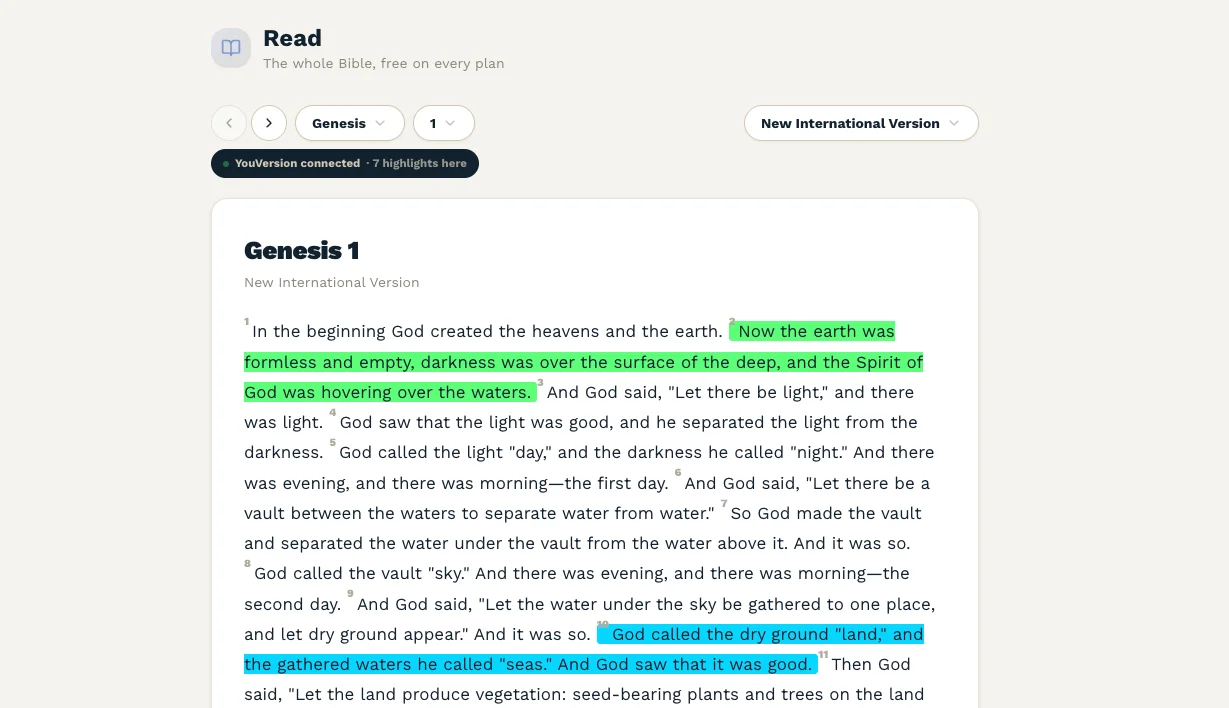
Highlights sync both ways. Deletions do not, and that is deliberate. YouVersion's highlights carry no timestamp, so there is no reliable way to tell "removed here first" from "added there later," and the wrong guess would erase something in your Bible App. We would rather leave you one extra tap. If YouVersion adds timestamps, we will revisit.
Signing in with YouVersion does not, by itself, share your highlights. The reader asks for that permission the first time you open a chapter, and you can say no.
4. Journal straight from a verse
This is the part that makes the rest worth doing. Reading and journaling used to be two separate places; now there is a door between them.
On the dashboard, paid plans get a Verse of the Day, drawn from YouVersion's own calendar. Two buttons: read the full chapter, or Reflect on this. In the reader, select any verse, including one you highlighted in the Bible App three years ago, and the same Reflect button is there.
Either way, a new session opens with that verse already tagged and a question that fits it. Psalm 46:10 opens on "Surrendering Control," because that verse already lives in that prompt. You are never staring at a blank page wondering how to begin. And because the reference is tagged, the entry keeps its verse for good.
Also: the whole Bible, free, in your translation
Until now Psalmlog's reader carried only public-domain texts. You could journal about a verse you read in the NIV that morning and get it back in the World English Bible. Accurate, and not the Bible you were holding.
The reader now has 46 versions across seven languages. In English that is 17, including the NIV, NASB (1995 and 2020), Amplified, NIrV and the Berean Standard Bible. Spanish, Portuguese, French, German, Hindi and Italian each open on a widely read modern version.
All of it is free on every plan, including Free. No session counter, no read limit, no upgrade prompt on the page. What you pay for in Psalmlog is the reflective session; the Bible itself was never going to be a feature. Read Leviticus twice in a sitting if you want.
How this came about
Back in August, Muse won Gloo and YouVersion's New Frontiers Prize, and that opened a conversation with the YouVersion Platform team about bringing the same source into Psalmlog. The path they laid out was simple: keep Scripture free, never alter the text, and build the practice around it. That was already how Psalmlog worked, so the main job was swapping the source and getting the translations people actually read.
I will be honest about one gap. The Bible App has over 3,500 versions. We have 46, the ones licensed to us today. That number will grow as publishers open their terms to apps like ours, but if you read in a language we do not carry yet, tell us and we will ask.
Sign in with YouVersion reaches the iOS and Android apps in the next release. Everything above is live in the web app now.
Take this into your practice
Reading and living are different things. This week’s prompt:
Open Read, find the last verse you highlighted in the Bible App, and write about why it stopped you the first time.
Journal this in PsalmlogNew to Psalmlog? Start here. Already here? Open Read, pick your translation, and see if your highlights are waiting.
Preston Zeller is the founder of Psalmlog. Our thanks to the YouVersion Platform team for the licensing path, and for their patience with our questions.