
Sermon Notes App with Personal Application
Psalmlog is a sermon notes app that turns Sunday's message into Monday's life. Capture the sermon by voice or text, then write what it means for your week, and Psalmlog brings back Scripture and a next step for that. Sunday's message, carried into Monday.
By Tuesday the sermon is a blur. Psalmlog keeps the part that hit you and asks what you'll do with it.
7-day free trial on paid plans · Cancel anytime · Free tier available with no card
Named Editor's Choice on faith.tools, the directory of Christian apps
- Capture sermon notes either way
- Voice + text
- Reflection turns sermon into action
- AI-applied
- Across all past sermons
- Searchable
- Bible translations
- Multi-lingual

The sermon lands, you nod, you take notes, and by Tuesday afternoon the message has slipped. Sermon-notes apps mostly solve capture. Psalmlog works on application: take what you heard, write what it means for your life, and get Scripture in response.
Use Psalmlog alongside your church's note-taking system or instead of it. Plenty of apps capture sermon notes well. The second step is the point: a six-point pastoral response to your reflection, Scripture cited, that turns Sunday's message into something to do this week.
Voice journaling is particularly useful for sermon application. Walk out of church and speak for two minutes about what landed and why. Psalmlog transcribes it and responds with Scripture, before the message fades.
Free tier with 3 lifetime entries on the web. Paid plans add the mobile app, voice notes, longer AI memory, and search across all past sermon notes.

How it works
The same shape every time, so it turns into a habit.
Capture the sermon, voice or text
Type during the message, voice-record after the service, or jot quick text bullets. Psalmlog supports all three. Voice transcription on Faith Builder + Shepherd.
Reflect on what it means for your week
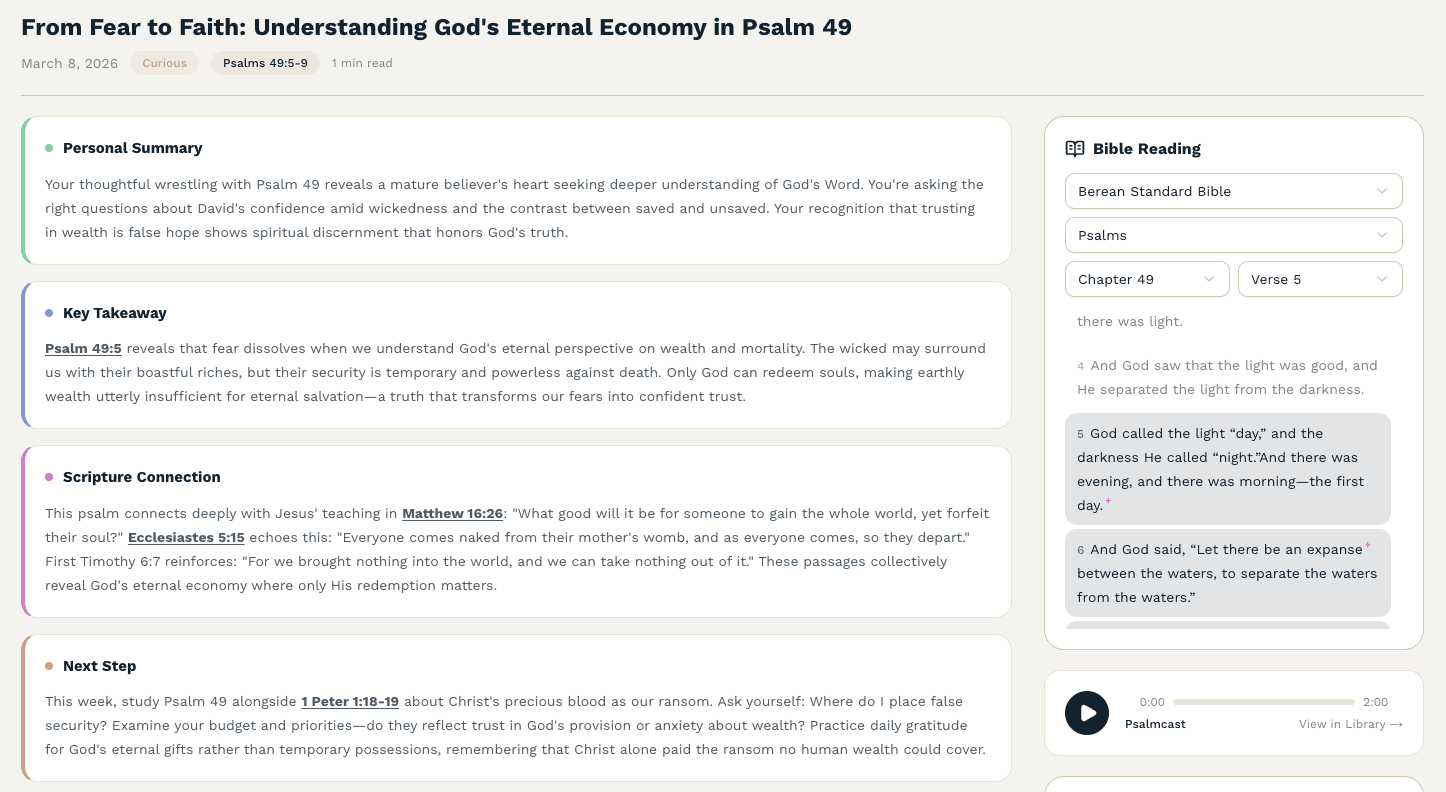
After the sermon, write or speak: "This is the part that hit me. Here's why. Here's what I'm wrestling with." Psalmlog responds to your reflection (not the sermon itself) with Scripture for your situation.
Track sermon themes across the year
Search past sermon notes by topic, passage, or theme. The insights dashboard surfaces recurring themes from your church's preaching and how you've applied them. A year of formation, on record.
What sets it apart
Voice or text sermon capture
Type during the message, speak after the service, or both. Voice transcription on Faith Builder ($19.99/mo) and Shepherd ($34.99/mo).
The application step
After capturing the sermon, write what it means for you. Back comes Scripture, a reflection, and a practical next step.
Searchable sermon archive
Search across all past sermon notes by topic, passage, or theme. See how a single passage was preached differently across months, or how a theme has recurred.
Insights dashboard for preaching themes
Surface the recurring themes from your church's preaching across the year. Track how often specific Bible books or topics come up, and how you've applied them.
Cross-app pairing
Use Psalmlog alongside your church's official sermon-notes platform (YouVersion notes, Subsplash, Logos Sermons). Psalmlog adds the application layer the platform-of-record may not have.
Privacy you can verify
Voice audio discarded after transcription, never stored. Notes and reflections encrypted at rest. AI services contractually prohibited from training on your data.
How Psalmlog's AI is different
The AI only quotes the Bible, and it tells you chapter and verse so you can check. It won't make up doctrine. If you write something that sounds like a crisis, you'll see 988 and Crisis Text Line first. We're a member of the Alliance for Faithful AI.
Psalmlog vs Generic note apps (Notion, Evernote, Apple Notes)
| Feature | Psalmlog | Generic note apps (Notion, Evernote, Apple Notes) |
|---|---|---|
| Captures sermon notes | Voice and text | Text, usually |
| AI Scripture matching for application | Six-point pastoral response | Notes sit untouched |
| Theme tracking across sermons | Insights dashboard surfaces recurring themes | Manual tagging only |
| Christian-specific framing | Scripture, every verse cited | Secular productivity tool |
| Voice transcription | Audio discarded, never stored | Often cloud-based; check privacy |
What people bring here
“For those early in their journey speaking to God and listening to His message, Psalmlog helps you navigate in an easy, convenient way. The guidance and insights are based on what you're actually going through from your journal entries — not just generic lessons.”
Nina W.
App Store review
“No matter what I'm going through, the app will connect that pain or happiness to Scripture. And the encouragement — it makes me feel better every single time. It's like my Christian bestie!”
Whitney T.
Psalmlog member
“This app has already started to change my life this week. My mother is on hospice, and it has guided me, given me readings for her, and helped me understand God's grace when I've been punishing myself for years.”
Elizabeth M.
App Store review
Frequently Asked Questions
Can I use Psalmlog with my church's existing sermon notes platform?
How is this better than Notion or Apple Notes for sermon notes?
Can I export my sermon notes archive?
Does Psalmlog have a way to share sermon reflections with a small group?
What if I want to take notes on a specific Bible passage being preached?
What does it cost?
Explore Psalmlog by use case
Psalmlog is built for many ways of meeting God in writing. Pick the path that fits where you are right now.
- Voice Bible Journaling
- Christian Journaling App
- Bible Journaling App
- Faith Journal App
- AI Biblical Guidance App
- Best AI Bible Study App
- Prayer Journal App
- AI Faith Journal
- AI Bible Study App
- Spiritual Journal App
- Devotional Journal App
- Daily Devotional App
- Christian Meditation App
- Journaling for Anxiety
- Journaling for Grief
- Audio Guided Devotionals
- Bible Action Steps App
Turn Sunday's sermon into Monday's life.
Capture the message. Reflect what it means. Get the Scripture. Free tier available.
- 7-day free trial
- Cancel anytime
- Private & secure